How Comment-to-DM Automation Works on Instagram (and How to Set It Up)
See how comment-to-DM automation sends a DM when someone comments on your Reel, what Meta's rules allow, and how to set it up step by step.
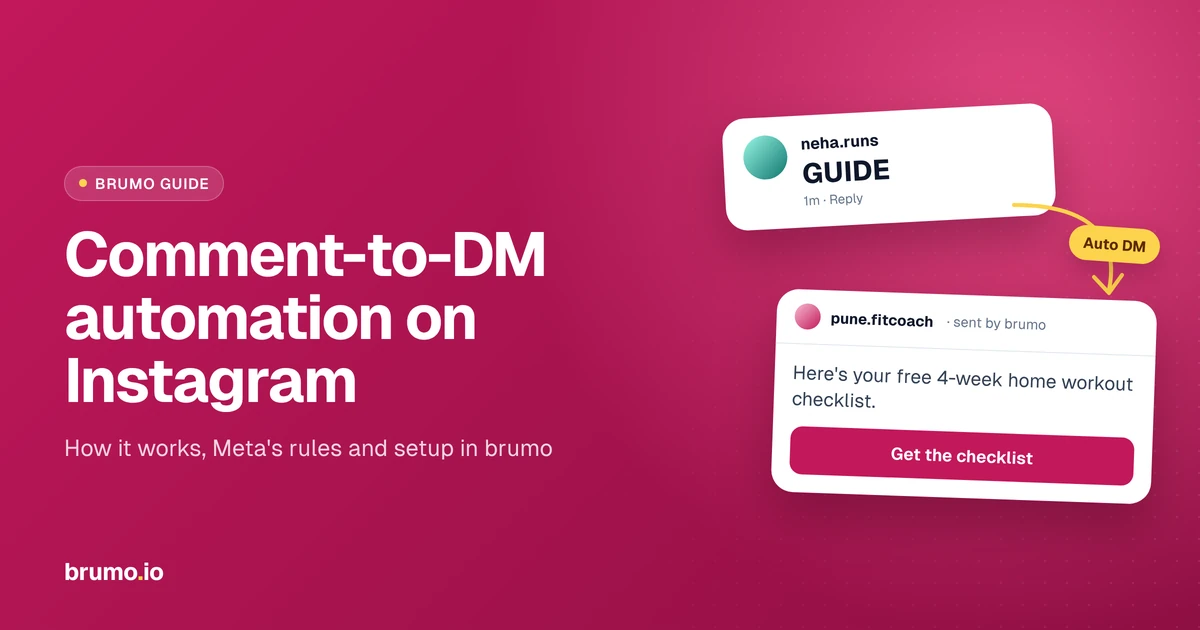
TL;DR: Comment-to-DM automation sends someone an Instagram DM automatically when they comment on your post or Reel, either on any comment or only on a keyword like "LINK". It runs on Meta's official Instagram API and needs a Professional account. As of October 2026, Meta allows one private reply per comment, sent within 7 days, and further messages only once the person responds. Set it up once per post and your link goes out while you're busy.
You post a Reel with "Comment GUIDE for the free checklist" in the caption. By morning there are 340 comments, and you're copy-pasting the same link into DMs one at a time. Comment-to-DM automation does that job for you: when someone comments, a DM goes out on its own, usually within seconds.
For creators, coaches and small businesses, it's one of the most useful automations on Instagram. The people commenting have already raised their hand and asked for the thing you offered. The only question is whether they get it in five seconds or five hours.
To use it well, it helps to know three things: what the automation actually sends, which Meta rules it has to follow, and how to set it up so it feels helpful rather than spammy. Each one builds on the one before, so the sections below follow that order, starting with what comment-to-DM actually is.
What is comment-to-DM automation?
Comment-to-DM automation sends an automatic Instagram DM to someone who comments on your post or Reel. You choose whether any comment triggers it or only comments with a keyword like "LINK" or "PRICE". The DM can carry a link, a file, an offer or the answer to a common question.
Meta calls that first automatic DM a private reply. It's a one-to-one message tied to a specific comment, and Meta's developer documentation on private replies lets a professional account send one to a person who commented on its post, Reel, ad or Live. brumo is built on that official feature, so it never logs in as you or taps buttons on your behalf.
The appeal is simple once you compare it with "link in bio". A bio link asks people to leave the Reel, open your profile, find the link and pick the right one. With comment-to-DM, they type one word and the link lands in their DMs, where they can find it again later.
That's the idea in one line. In practice, a comment can set off a short sequence of messages, so let's follow one comment from start to finish.
How does comment-to-DM automation work, step by step?
When someone comments, brumo sends them a DM. Depending on what you switch on, that can be a short first message with a button, a request to follow you, or the resource itself. An optional follow-up can nudge people who haven't opened the link yet. The whole exchange happens inside their Instagram DMs.
1. Someone comments
It starts with a comment on the post or Reel you've chosen. In brumo, you decide whether any comment counts or only comments that contain your keyword. A keyword gives you control: someone who writes "nice video" won't get a DM they didn't ask for.
2. The first message (optional)
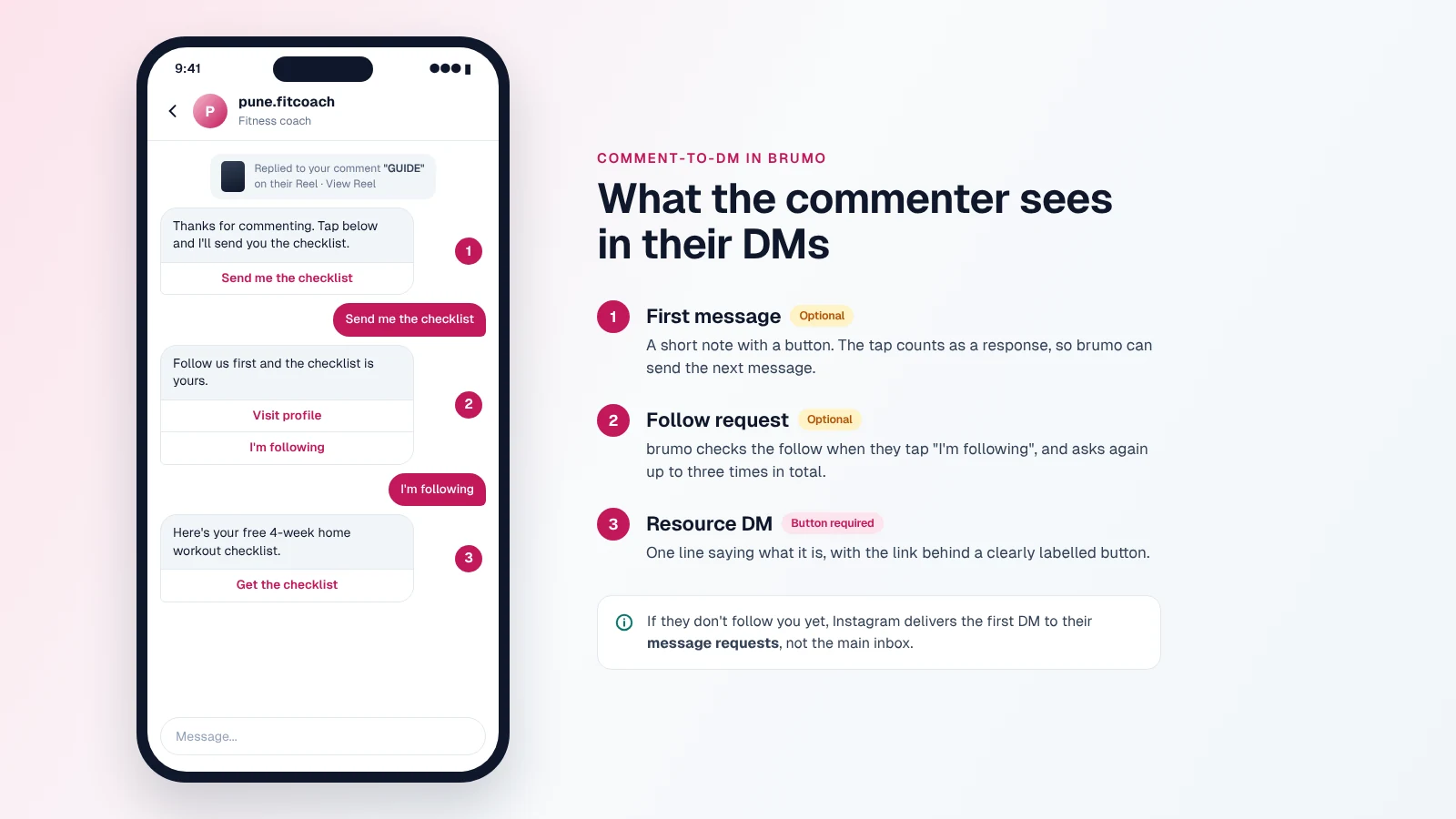
Next, brumo can send a short first message with a button, like "Send me the guide". It's optional, so you can switch it off and let the comment lead straight to the next step.
There's a good reason to keep it on. Meta lets a business keep messaging someone only after they respond, and Meta's messaging rules count tapping a button inside the conversation as a response. That one tap opens the door for the messages that follow.
3. The follow request (optional)
After that, brumo can ask people to follow you before they get the resource. This message has two buttons: "Visit profile" and "I'm following". When someone taps "I'm following", brumo checks. If they haven't followed yet, it sends the follow request again, up to three times in total, then stops.
The resource goes only to people who follow and tap "I'm following". It can turn a popular Reel into new followers, but it adds a step, so it works best for resources people genuinely want.
4. The resource DM
Then comes the message they asked for: the link, the PDF, the price list, the discount code or the workshop details. In brumo, this message always carries a button, so the resource sits one clearly labelled tap away. A line or two above it says what they're getting.
5. The follow-up (optional)
Finally, some people get the resource DM and never tap it. brumo can send a follow-up message to remind them after a set gap. It's opt-in, and you can set the interval up to a maximum of 12 hours.
You may have noticed that every step waits for the person to do something: comment, tap, follow. That isn't a design choice by brumo alone. It comes straight from Meta's rules for messaging on Instagram.
What are Meta's rules for comment-to-DM?
As of October 2026, Meta allows one private reply per comment, sent within 7 days of the comment. On Instagram Live, it only works while the broadcast is live. After that first message, a business can keep messaging only once the person responds, inside a 24-hour window.
These rules apply to every tool that sends DMs through Meta's API, brumo included. Here's what each one means for you.
One message per comment, within 7 days
You get one private reply per comment. If your automation was off when someone commented, you have 7 days to reach them before that comment's window closes. That's why it's worth switching brumo on before a Reel goes live, not after it takes off.
The 24-hour window
Once the person responds, by replying or tapping a button, you can message them for the next 24 hours. A fresh response starts a fresh window. Outside it, automated messages can't go out, which is why the button taps in the flow above matter so much.
Why pacing matters
The last rule is about speed. As of October 2026, Meta's rate limits for Instagram messaging allow 750 private replies per hour per account for post and Reel comments. A Reel that pulls thousands of comments in an hour can run into that.
brumo keeps a steadier pace on purpose. It sends at most 150 DMs per hour per account and queues the rest for later hours, so a busy Reel doesn't send everything in one burst.
Those are the outer limits. Inside them, the setup itself is simple, as long as a few things are ready before you start.
What do you need before you start?
You need an Instagram Professional account (Business or Creator), a brumo account, a post or Reel to run it on, a keyword or the choice to reply to every comment, and the thing you're sending. Personal accounts can't use comment-to-DM through Meta's API.
Here's the short checklist:
- A Professional account. Business or Creator both work.
- A brumo account. It's free to start.
- A post or Reel. brumo can run on one specific post or across all your posts.
- A trigger. One short keyword, or any comment.
- The resource. A working link, file or answer, ready to paste.
- A second account, or a friend, to test with, so you see exactly what commenters see.
Switching from a personal account
If you're still on a personal account, switch that first. It's free and takes about a minute: go to your profile, open the menu, choose Account type and tools, then tap Switch to professional account.
One thing to know before you do: Instagram's Help Centre says that if your account is private, switching makes it public and accepts any pending follow requests.
With a Professional account in place, you're ready to build your first automation.
How to set up comment-to-DM automation in brumo
Setting up comment-to-DM in brumo takes a few minutes, and you can do it all on the Free plan. If you'd like a quick overview first, see how brumo's automations work. Otherwise, here's the full setup, from sign-up to your first live automation.
- 1.Create your brumo account. Go to brumo.io and sign up for brumo for free. No technical setup is needed.
- 2.Connect your Instagram Professional account. brumo is built on Meta's official Instagram API, so you connect through Instagram's own login screen.
- 3.Create a Comment-to-DM automation and choose where it runs. Pick one specific post or Reel, or all your posts.
- 4.Set the trigger. Choose any comment, or a keyword. One short word in capitals works better than a phrase: a saree seller might use PRICE, a CA sharing tax tips TAX, and a fitness coach PLAN.
- 5.Write the first message, or switch it off. If you keep it, two lines and a button are enough, for example: "Thanks for commenting. Tap below and I'll send you the checklist."
- 6.Decide on the follow request. Turn it on if you want people to follow before they get the resource. Leave it off to keep the flow as short as possible.
- 7.Write the resource DM and add its button. Write one or two lines saying what they're getting, then put your link behind the button. Buttons are required in brumo, so give it a label that names the resource, like "Get the checklist".
- 8.Add a follow-up, if you want one. Keep it short and friendly, and pick a gap of up to 12 hours.
- 9.Turn it on, test it and add the caption. Comment your keyword from a second account and check the DMs arrive. Then put the call to action in your caption: "Comment GUIDE and I'll DM you the checklist."
That's the technical part done. Whether people are glad to get your DM depends less on the setup and more on a few choices you make along the way.
Mistakes that make comment-to-DM feel spammy
Most comment-to-DM problems aren't technical. They come from how the automation is set up, and each one is easy to fix in brumo.
A vague keyword. "YES" or "INFO" gets typed by people who aren't asking for anything. Pick a word tied to the offer, like "GUIDE" or "PRICE".
A button with no context. A button labelled "Click here" with nothing above it looks like spam. Add one line saying what it is, and label the button with what they'll get.
No call to action in the caption. If you don't tell people what to comment, most won't. Put the keyword in the caption, and in the video if you can.
Any comment, on every post. Someone writing "congrats" shouldn't get a sales message. Use any comment only on posts where every commenter wants the same thing.
Treating the follow request as a toll. Asking for a follow before a two-line tip feels like a trade nobody wanted. Keep it for resources with real value.
Going quiet after the DM. Automation handles the first reply. The real conversation is still yours, so reply when people write back.
Key takeaways
- Comment-to-DM automation sends an automatic DM when someone comments on your post or Reel, on any comment or only on a keyword.
- It needs an Instagram Professional account and runs on Meta's official Instagram API.
- As of October 2026, Meta allows one private reply per comment, sent within 7 days of the comment.
- Further messages go out only after the person responds, inside a 24-hour window. Tapping a button counts as a response.
- In brumo, the first message, the follow request and the follow-up are all optional, so you choose how short or long the flow is.
- A short keyword, a clear caption call to action and a clearly labelled button in the DM do most of the work.
Start with one Reel
Pick a post that already gets questions in the comments. Set up one automation, test it from a second account and watch how people respond over a few days. Then add it to your next Reel.
You can set up your first comment-to-DM on brumo for free. The Free plan includes up to 1,000 DMs a month, which is plenty to try it on a few posts. If you outgrow it, the Pro plan is ₹499 a month and gives you a higher DM limit and more features. You can compare brumo's Free and Pro plans before you decide.
Frequently asked questions
Is comment-to-DM automation allowed on Instagram?
Yes, when it runs through Meta's official Instagram API, as brumo does. Meta built private replies so professional accounts can message people who comment on their posts, and the person commenting starts the exchange. What isn't allowed is software that logs in with your password to follow, like or message strangers. As of October 2026, stay inside Meta's limits: one private reply per comment, within 7 days, and further messages only after the person responds.
Can I use comment-to-DM on a personal Instagram account?
No. Comment-to-DM through Meta's API, including brumo, works only with an Instagram Professional account, either Business or Creator. Switching is free and takes about a minute from Account type and tools in your profile menu. If your account is private, Instagram's Help Centre notes that switching makes it public and accepts any pending follow requests, so decide on that first.
Does comment-to-DM work on old posts?
It can, within limits. As of October 2026, Meta allows a private reply only within 7 days of a comment, so comments older than that can't get an automatic DM. New comments on an old post do count, because the 7 days run from each comment, not from the day you posted. That makes it worth running brumo on older Reels that still get steady comments.
Why didn't someone get my automatic DM?
Start with their message requests. Meta's documentation says a private reply lands in the person's main Inbox if they follow you, and in their Requests folder if they don't, so many "missing" DMs are sitting there. Other common causes: the comment didn't match your keyword, it was older than 7 days, the automation was switched off in brumo, or your Instagram connection needs reconnecting. Adding "check your message requests" to your caption saves a lot of confusion.
Can I send a link in an Instagram DM automatically?
Yes, and it's the most common use of comment-to-DM. The person comments, and brumo sends the resource DM with your link behind a button, either straight away or after a short first message and a tap. Buttons are required in brumo, so give yours a clear label like "Get the guide". The link can be a free guide, a product page, a booking form or an affiliate link. Add a line above the button saying what it is, so the message doesn't look like spam.
Do people have to follow me to get the link?
Only if you choose that. brumo can ask people to follow before sending the resource. The person gets a message with "Visit profile" and "I'm following" buttons, and brumo checks the follow when they tap "I'm following". If they haven't followed, it asks again, up to three times in total, then stops. The resource goes only to people who follow and tap "I'm following".
Does Instagram have its own comment-to-DM feature?
Meta Business Suite includes a basic comment-to-message option among its inbox automations, set up from the Inbox on desktop. It suits simple cases where one automatic reply is enough. brumo adds a choice of any comment or keyword, buttons, an optional follow request and timed follow-ups. Meta updates its built-in options from time to time, so check Business Suite to see what's available on your account today.
Is comment-to-DM automation free?
It can be. Meta Business Suite's built-in option is free, and brumo has a Free plan that includes up to 1,000 DMs a month, which is enough to try comment-to-DM on a few posts and see how your audience responds. If you need more, brumo's Pro plan costs ₹499 a month and gives a higher DM limit and more features. Start with one post before deciding what you need.